Flutter code generation and app bundle size: FAQ

After 2 years of not writing and ditching my readers, I am trying to get back to writing again. The past couple of years have been really busy with freelancing on Upwork, where I delivered multiple apps for clients that are generating steady MRR.
I’m starting with some topics that might sound trivial but can be confusing to many Flutter developers.
Let’s try to answer these questions that you may have come across while using flutter and its build_runner.
Is codegen secretly bloating your app size? (It’s not.)
Will static metaprogramming make tools like build_runner obsolete?
How are you handling generated files? Do you commit them to VCS?
Is build_runner getting slower as the project grows? Can you fix it? Yes? How?
What determines the Flutter app size, and how do you make it smaller?
Flutter provides tools to analyze the size breakdown of your app’s final build.
There is a special flag that many might not know about, which allows you to view the final contents of the release build. With this command, the Dart compiler will monitor package usage and code utilization within the app, generating a JSON report that details the build contents.
flutter build ipa --analyze-sizeThe --analyze-size flag lists all the components of the bundle, including the frameworks used, their sizes, and the total asset size of the final bundle. This is how it will look like.
This command also generates a JSON file that we can use to view a TreeMap with dart DevTools.
dart devtools --appSizeBase=ios-code-size-analysis_02.jsonOnce you run the command, you can see the TreeMap with all the details interactively. You can also click on one node and explore further.
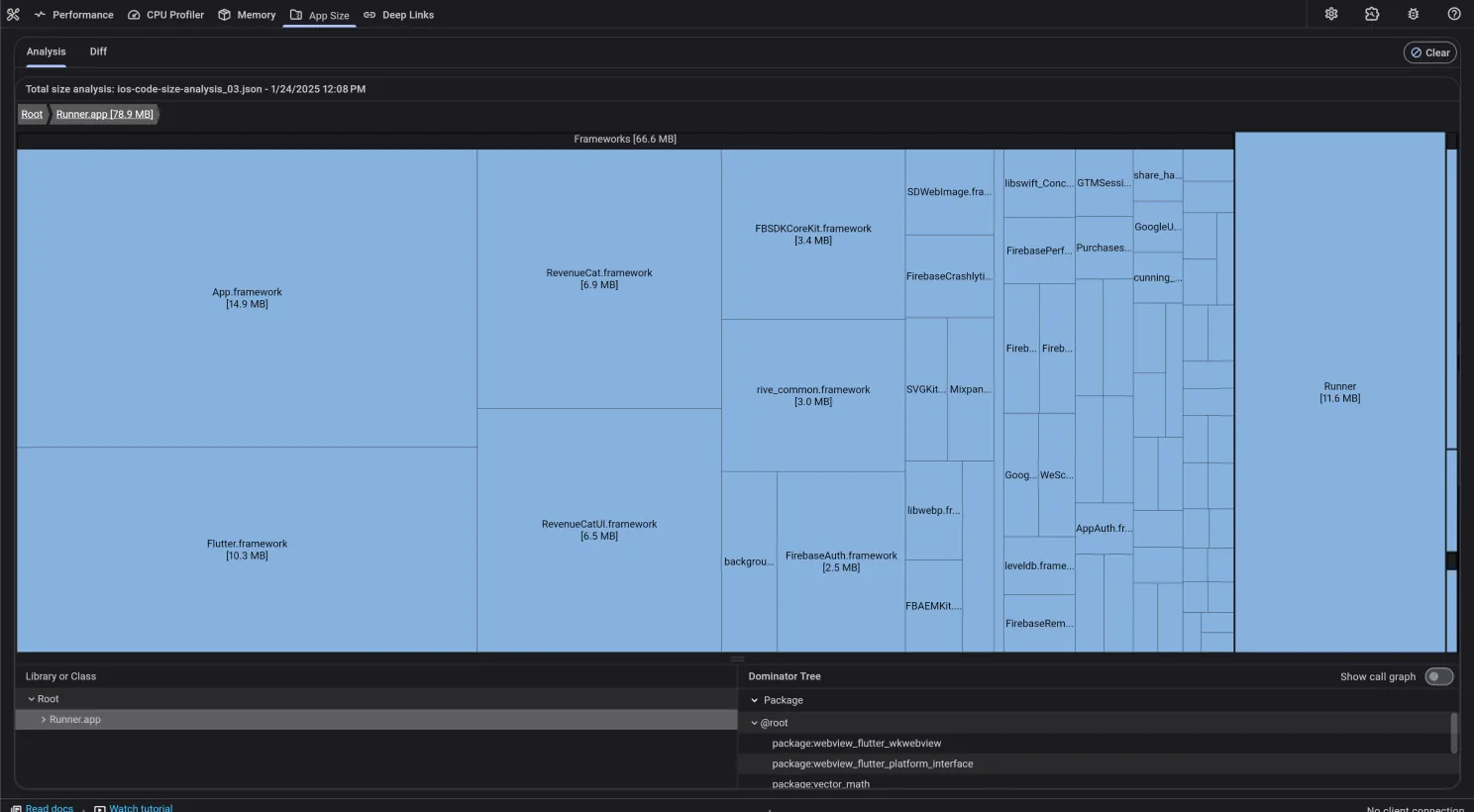
Now it’s clear that using codegen won’t significantly increase the app size (it might only add a few kilobytes), so we don’t need to worry about it bloating the app.
What happens if I list multiple packages in pubspec.yaml but don’t actually use them?
When you have specified packages/plugins to use in your flutter project, the Dart compiler will treeshake all the unused dart code optimizing the app’s size. The tricky part is with the plugin (ones containing native dependencies).
▶ Watch on YouTube If your pubspec.yaml contains unused plugins, the Dart compiler will treeshake unused Dart code, but native dependencies will remain, increasing the app size.
To prevent this, remove unused packages from pubspec.yaml and regularly check for unused dependencies.
You can use available tools to scan for your unused dependencies and assets from your codebase.
dependency_validator reports any missing, under-promoted, over-promoted, and unused dependencies. Any package that either provides an executable or a builder that will be auto-applied via the dart build system will be considered used even if it isn’t imported.
Flutter: Find Unused Dart Files & Assets is a VS code extension which allows you to find unused assets, dart files & dependencies in your project.
If I list an asset in pubspec.yaml but don’t use it within the app, will it still get bundled into the application?
Yes. If you list an asset in your pubspec.yaml but don’t use it within your Flutter app, it will still be bundled into the application. This applies to most assets like images, sounds, or general files: the asset bundling process does not remove unused assets based on their use in the code.
What about the message about fonts being tree-shaken while you build for Android?
The message about fonts being “treeshaken” refers to Flutter’s font tree-shaking feature. This feature is different from how assets like images or other files are handled.

When you build your Flutter app in release mode, Flutter includes only the font glyphs (characters) that are actually used in your app.
Flutter analyzes your app’s text usage and optimizes font files by including only the required characters. This is why you see the “fonts being treeshaken” message during the build.
Will static metaprogramming make tools like build_runner obsolete?
The Dart macro system has introduced support for static meta-programming to the Dart language.
This means that, when the feature is live, we could use annotations and the dart compiler will JIT compile the annotations to code on the fly. Most of the notable packages are planning to adopt this approach to mitigate the shortcoming of the build_runner (time consuming).
Here’s Remi Rousselet talking about rewriting Freezed with macros.
How are you handling generated files? Do you commit them to VCS?
Using tools like build_runner generates a significant number of files, which can be cumbersome to manage, potentially leading to issues like merge conflicts if not handled correctly.
Committing these files to a version control system would be a matter of preference and is somewhat opinionated.
Personally, I do not check these files into VCS when working on collaborative projects to avoid merge conflicts.
If you choose not to check these files into your VCS, you may need to add an additional build step in your CI process to generate these files, which might increase your CI build time.
https://stackoverflow.com/questions/893913/should-i-store-generated-code-in-source-control
Is build_runner getting slower as the project grows? Can you fix it?
As your project expands with more files and additional build_runner generators, the overhead increases, leading to longer times for code generation.
This can be optimized by creating a build.yaml file and explicitly telling the generator which files to check for code generation. This can drastically decrease the codegen time.
Here’s an example of such build.yaml file.
targets:
  $default:
    builders:
      freezed:freezed:
        generate_for:
          exclude:
            - test/**.dart
          include:
            - lib/**/*data/**/*.dart
            - lib/**/*models/**/*.dart
            - lib/**/*domain/**/*.dart
            - lib/core/error/failures/**/*_failure.dart
            - lib/features/**/*bloc/*_bloc.dart

      injectable_generator:injectable_builder:
        generate_for:
          exclude:
            - test/**.dart
          include:
            - lib/**/*_{bloc,data_source,interceptor,http_client,repository,service,plugin,viewmodel}.dart
            - lib/**/*usecases/**/*.dart
            - lib/core/di/**/*.dart
            - lib/domain/**/*_{factory,api,filters,impl}.dart
            - lib/network/**/*.dart

      json_serializable:json_serializable:
        generate_for:
          exclude:
            - test/**.dart
          include:
            - lib/**/*{data,models,domain}/**/*.dart
        options:
          create_factory: true
          create_to_json: true
          field_rename: snake
          explicit_to_json: true

      retrofit_generator:
        generate_for:
          exclude:
            - test/**.dart
          include:
            - lib/**/*{data_source,http_client}.dart

      stacked_generator:
        stackedBottomsheetGenerator:
          generate_for:
            exclude:
              - test/**.dart
            include:
              - lib/**/*_bottom_sheet.dart

        stackedDialogGenerator:
          enabled: false

        stackedLocatorGenerator:
          enabled: false

        stackedFormGenerator:
          enabled: true
          generate_for:
            exclude:
              - test/**.dart
            include:
              - lib/**/*_view.dart

        stackedLoggerGenerator:
          enabled: true
          generate_for:
            exclude:
              - test/**.dart
            include:
              - lib/**/*_view.dart
              - lib/core/setup/config/logger.dart
              - lib/core/setup/circles_app.dart

        stackedRouterGenerator:
          enabled: true
          generate_for:
            exclude:
              - test/**.dart
            include:
              - lib/**/*_{view,navigator,screen}.dart
              - lib/core/setup/config/routes.dart
Although this reduces the time it takes to run codegen, using this method without proper code architecture will be a nightmare, causing even more problem in the longer run.
https://johnthiriet.com/optimizing-your-flutter-build-runner-for-faster-development/
That’s it for today. If you have questions or a topic you want covered, write it in the comments.